

YappApp Leeds: Complete Guide to the Local Real-Time Community App
Introduction
If you live in Leeds, you know how quickly a normal day can change. A road suddenly closes, emergency services arrive somewhere nearby, a local incident develops, or something unusual starts attracting attention across the neighbourhood. The difficult part is often not finding information—it is finding relevant information quickly enough.
That is where YappApp Leeds becomes interesting.
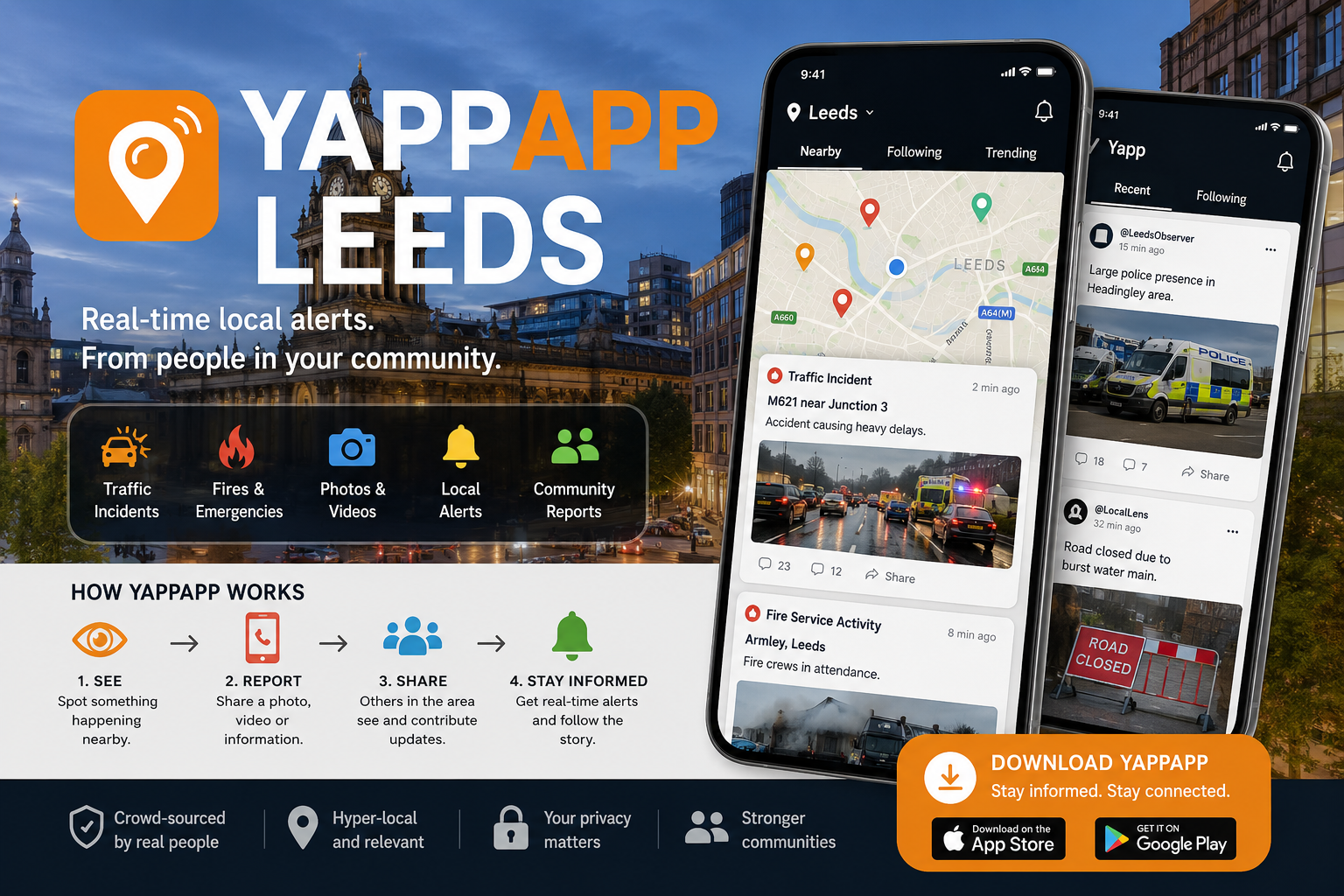
Yapp, developed by YappApp Ltd, describes itself as a location-based, crowdsourced platform for sharing real-life moments and local incidents in real time. Its App Store listing focuses on hyper-local alerts, user-submitted photographs and videos, location-based feeds, notifications and collaborative reporting.
There is an important distinction worth making at the beginning: YappApp Leeds is not the same product as Yapp, Inc.’s event-management application. The latter is designed for conferences, meetings, schools, sports teams and other organised events.
This guide focuses on the YappApp platform associated with YappApp Ltd and its real-time community reporting model, particularly its relevance to Leeds.
What Is YappApp Leeds?
YappApp Leeds refers to the use of Yapp’s location-based community reporting platform around Leeds and surrounding areas.
In simple terms, Yapp allows people to:
- See local incidents and happenings.
- Receive location-based alerts.
- Share photographs and videos.
- Contribute reports about events around them.
- Follow developments as a situation changes.
- Choose locations they are interested in.
- Receive notifications through the app.
- Build a broader picture of an incident from multiple user perspectives.
The App Store describes Yapp as a crowdsourcing citizen-reporting app covering subjects ranging from traffic incidents and road closures to fires, water rescues, breaking news and ordinary local moments.
That makes the Leeds use case particularly straightforward: instead of treating the app as a traditional news publication, think of it as a real-time layer of community-sourced information.
Why Leeds Is a Natural Use Case
Leeds is a large and highly active urban area, with busy roads, residential neighbourhoods, universities, businesses, events and a substantial surrounding population.
For a location-based reporting platform, that creates an important advantage: more activity can mean more opportunities for users to report what they are seeing.
The value, however, depends heavily on participation. A crowdsourced platform is only as useful as the quality, accuracy and timeliness of the reports being contributed.
How Does YappApp Work?
The easiest way to understand Yapp is to follow the journey from an incident to an alert.
1. Something happens
An incident or notable event occurs in a local area.
It could be something relatively ordinary, such as a traffic problem, or something much more significant, such as a fire or major emergency response.
2. A user reports it
A Yapp user can contribute photographs, videos or information.
The platform’s listing says users can contribute to a shared “Yapp” and that multiple perspectives can be added to the same incident. Anonymous participation is also described as an option.
3. Other users discover the report
People interested in the relevant location can encounter the report through the app’s feeds and notification system.
This is where the location-based model becomes useful. Instead of consuming a general stream of national news, users can concentrate on information relevant to their chosen areas.
4. The story can develop
One photograph might show only part of an event.
Additional users may provide another angle, updated information or new media. Yapp’s model is therefore less like publishing a finished newspaper article and more like building a live community record as an event develops.
5. Notifications keep users informed
Yapp provides Inbox and notification functionality designed to keep users updated as activity develops.
For someone monitoring Leeds while travelling, commuting or away from home, that can be more useful than manually checking social platforms every few minutes.
What Can You Find on YappApp Leeds?
Yapp’s description gives a broad picture of the types of content users may encounter.
Traffic and Road Incidents
Traffic-related information is one of the most obvious applications.
Reports can include:
- Vehicle crashes
- Road closures
- Traffic disruption
- Emergency-service activity
- Other road-related incidents
For commuters, the appeal is obvious: a visual report can sometimes provide useful context that a short text alert cannot.
Emergency Incidents
Yapp also positions itself around major incidents such as fires and water rescues.
This should not be interpreted as a replacement for emergency services or official instructions. A crowdsourced report can be useful for awareness, but it should never be treated as authoritative emergency guidance.
Community Moments
Not everything has to be serious.
The platform also highlights funny moments, local happenings and other everyday events.
That broader definition is important because it separates Yapp from a conventional emergency-alert system. It is designed around life happening around you, rather than a single category of incident.
National and Trending Incidents
Although location is central to Yapp, its listing also refers to national and trending incidents.
This gives users a way to move between hyper-local information and events attracting wider attention.
YappApp Leeds Features Explained
The feature set is easier to evaluate when separated into practical use cases.
| Feature | What it does | Why it matters |
|---|---|---|
| Local alerts | Highlights activity around selected locations | Helps users stay aware of nearby events |
| Crowd reporting | Allows users to contribute information | Creates a community-driven information layer |
| Photos and videos | Adds visual evidence and context | Makes reports easier to understand |
| Notifications | Sends updates to users | Reduces the need for constant manual checking |
| Location selection | Lets users focus on areas of interest | Makes the feed more relevant |
| Multiple perspectives | Allows different users to contribute to an incident | Can provide broader context |
| Anonymous reporting | Allows reports without publicly identifying the contributor | Useful for some community situations |
| Yapp Pro | Adds paid features | Provides additional controls and functionality |
Yapp’s current App Store listing also describes Pro features including an ad-free experience, content downloads, higher-resolution video, priority report visibility, additional alert zones, an additional home location, early access to features, edit suggestions, content monetisation and tappable profile links.
Is YappApp Leeds a News App?
Yes, but with an important qualification.
Yapp is currently listed in Apple’s News category, while its core model is based on user-generated, crowdsourced information.
That means it should not automatically be evaluated like a traditional newspaper.
A newspaper normally has an editorial process involving reporters, editors and publication standards. Yapp’s model starts with members of the community witnessing and sharing events.
That difference creates both the platform’s biggest advantage and one of its biggest weaknesses.
The Advantage
Information can appear quickly because it does not necessarily have to pass through a conventional newsroom before users see it.
The Risk
A user-generated report can be incomplete, mistaken, outdated or lacking context.
The right mindset is therefore:
Use Yapp as an early source of local awareness, not as the final authority on a serious event.
For significant incidents, verify important information through official sources such as police, local authorities, transport organisations or emergency services.
Is YappApp Leeds Accurate?
There is no sensible way to guarantee that every crowdsourced report is accurate.
That is true of virtually any platform where users can submit information in real time.
Yapp’s own App Store description emphasises reporting by real people in local areas and describes the service as being updated continuously.
The practical question is therefore not simply “Is Yapp accurate?” but:
How should a user judge a report?
Look for:
- Multiple perspectives — Are several users reporting the same event?
- Recent timestamps — Is the information still current?
- Visual evidence — Are photographs or videos available?
- Location consistency — Does the reported location make sense?
- Official confirmation — Has an authoritative organisation confirmed the incident?
- Updates — Has the original report changed as more information becomes available?
This is particularly important for emergencies. A social or crowdsourced report should not override official instructions.
YappApp Leeds and Privacy
Location is fundamental to the product, so privacy deserves more attention than it receives in many casual app reviews.
Apple’s current listing says YappApp Ltd indicates that the app may handle precise location, contact information and user-generated photos or videos for functionality. It also indicates that usage data may be used for tracking and that certain identifiers and usage information may be used for advertising and analytics.
The same listing notes that location may be used even when the app is not open, which can affect battery life.
That does not automatically make the app unsafe. It does mean users should understand what they are enabling.
A Sensible Privacy Checklist
Before using Yapp regularly:
- Review location permissions.
- Decide whether continuous location access is necessary for your usage.
- Check notification settings.
- Review what personal information you provide.
- Consider whether you want your reports associated with your identity.
- Read the developer’s current privacy policy.
- Revisit permissions after major app updates.
Privacy settings can change over time, so the current app permissions should always take priority over an old review.
YappApp Leeds on iPhone
Yapp’s dedicated local-reporting application is available through Apple’s UK App Store and is published by YappApp Ltd. The current listing identifies it as a News app and requires iOS 17.6 or later for iPhone and iPad.
The listing also shows a continuing release history, including version 2.2.6 in July 2026, with recent releases focused on bug fixes and improvements.
That ongoing release pattern matters because a live-location application depends heavily on reliability, notification handling, mapping and location functionality.
What Is Yapp Pro?
Yapp Pro is the platform’s paid upgrade.
According to the current UK App Store listing, the subscription is:
- £2.99 per month
- £29.99 per year
- 7-day free trial for both plans
The listing says Pro includes features such as removing advertisements, downloading your own content, higher-resolution video, boosted report visibility, extra alert zones and an additional home location.
Is Yapp Pro Worth It?
That depends entirely on how you use Yapp.
For an occasional user who simply wants to look at local incidents, the free experience may be sufficient.
A heavy contributor may find additional alert zones, content tools and visibility features more valuable.
The annual plan also changes the economics: at the listed prices, £29.99 per year is considerably cheaper than paying £2.99 every month for twelve months.
The important point is not to subscribe because a feature exists. Subscribe only if the additional functionality solves a problem you actually have.
YappApp Leeds vs Traditional Social Media
One reason someone might search for YappApp Leeds is frustration with conventional social feeds.
The two models are quite different.
| YappApp | General social media |
| Strong location emphasis | Usually broader audience targeting |
| Incident-focused content | Wide range of content |
| Designed around real-time local activity | Often driven by social relationships and algorithms |
| User-generated reporting | User-generated content |
| Multiple perspectives can build an incident | Posts are often independent |
| Location-based alerts | Notifications often depend on follows/interactions |
Neither model is perfect.
Social media has a huge user base and can surface information quickly. Yapp’s advantage is more focused: locality and incident context are central to the product rather than secondary features.
A More Useful Way to Use YappApp in Leeds
The best experience comes from treating Yapp as an information-monitoring tool rather than an endless entertainment feed.
For Commuters
Choose locations relevant to your regular journey.
You may be more interested in road incidents, closures and unexpected disruptions than events happening several miles away.
For Residents
Set your home area as the primary point of interest, then consider nearby locations where you regularly spend time.
For People Travelling
The location model can become useful when visiting another city or region because the app is designed around current and selected locations.
For Community Contributors
If you witness an incident, focus on accurate observation rather than speculation.
A useful report should answer basic questions:
- What happened?
- Where did it happen?
- When did you see it?
- What can you actually verify?
- Is the situation still developing?
That approach produces much more valuable community information than posting a dramatic headline without context.
Common Mistakes When Using YappApp Leeds
Mistake 1: Treating Every Post as Confirmed News
Crowdsourced does not mean verified.
Use reports as signals, then verify important claims.
Mistake 2: Sharing Unnecessary Personal Information
A photograph can reveal more than intended.
Before uploading, consider whether faces, addresses, vehicle registrations, documents or other sensitive information are visible.
Mistake 3: Ignoring Location Permissions
Location is a core part of the experience, but users should understand how much location access they are granting.
Mistake 4: Assuming the App Replaces Official Alerts
It does not.
For emergencies or public-safety instructions, official authorities remain the appropriate source.
Mistake 5: Paying for Features You Do Not Need
Yapp Pro adds functionality, but casual users may not benefit enough to justify the subscription.
Expert Analysis: Where YappApp’s Model Works Best
Yapp’s most interesting feature is not simply its ability to publish photographs.
It is the combination of location + speed + community participation + multiple perspectives.
That combination addresses a real information problem.
Traditional news can be authoritative but slower.
Social media can be fast but noisy.
Official alerts can be reliable but limited in detail.
A crowdsourced location platform sits somewhere between these models.
Its strongest use case is therefore the early information layer: something is happening, people nearby are seeing it, and users want to understand what is happening before a complete account is available.
Its weakest use case is when users expect every report to have newsroom-level verification.
That distinction is essential for understanding YappApp Leeds.
Is YappApp Leeds Legit?
There are several indicators that the platform is a real operating product rather than simply an informal social-media page.
The Apple App Store identifies YappApp Ltd as the developer of the application.
A LinkedIn profile for Yapp App identifies the organisation in Leeds and lists its website and Linktree presence.
There is also a UK company record for YAPPAPP LTD, company number 14713728. Companies House records show the company as active in the available filing information, although its correspondence address is now in Mildenhall rather than Leeds.
This is worth clarifying because search results can easily create confusion: an older company named YAPPAPP LTD, company number 09140945, was incorporated in 2014 and dissolved in September 2017.
So users should avoid assuming that similarly named Companies House records automatically represent the same current business.
YappApp Leeds Checklist
-
Download the correct Yapp application from the official app store.
-
Confirm that the developer is YappApp Ltd.
-
Review location permissions before regular use.
-
Configure the locations that matter to you.
-
Enable notifications only if you want real-time alerts.
-
Treat crowdsourced reports as information rather than automatic fact.
-
Cross-check serious incidents with official sources.
-
Be careful when uploading photographs or videos.
-
Review the privacy policy and app permissions.
-
Decide whether Yapp Pro features justify the subscription.
Future of YappApp Leeds
The broader direction of location-based community reporting is likely to depend on three things: trust, speed and signal quality.
Getting information online quickly is no longer difficult. The harder problem is helping people distinguish useful local information from noise.
Yapp’s multiple-perspective model points toward one possible solution: instead of relying on a single post, an incident can develop through contributions from several people.
The challenge is moderation and verification.
As the volume of user-generated material grows, platforms in this category will need increasingly strong systems for handling misinformation, duplicate reports, inappropriate material, privacy concerns and rapidly changing incidents.
Accessibility is another area worth watching. One recent App Store review specifically criticised the app for lacking adequate accessibility support for VoiceOver users, while Apple’s listing currently says the developer has not indicated supported accessibility features.
That is an important product-development opportunity. A community reporting application becomes more useful when the widest possible range of residents can participate.
Frequently Asked Questions
What is YappApp Leeds?
YappApp Leeds refers to using Yapp’s location-based, crowdsourced reporting platform around Leeds. It allows users to discover and share local incidents, photographs, videos and real-time community updates.
Is YappApp Leeds a real app?
Yes. The local-reporting Yapp application is listed in Apple’s UK App Store under YappApp Ltd as the developer.
Is Yapp the same as the Yapp event app?
No. There are multiple products called Yapp. Yapp, Inc. operates an event-focused application for conferences, schools, sports teams and other organised groups, while YappApp Ltd’s product focuses on real-time crowdsourced local reporting.
Can YappApp send local alerts?
Yes. Yapp describes hyper-local alerts, Inbox functionality and notifications designed to keep users informed about activity around selected locations.
Can users report incidents anonymously?
The Yapp App Store description says users can build a Yapp with others and contribute anonymously if they choose.
Does YappApp Leeds cover traffic incidents?
Traffic-related events are specifically included in the platform’s description, including crashes and road closures.
How much does Yapp Pro cost?
The UK App Store currently lists Yapp Pro at £2.99 per month or £29.99 per year, with a 7-day free trial for the subscription options shown.
Is YappApp a replacement for official emergency information?
No. It is a crowdsourced reporting platform. For emergencies, public-safety instructions and confirmed information, users should rely on the relevant official authorities.
Does Yapp use location information?
Yes. Apple’s current privacy information indicates that precise location can be used for app functionality and notes that location may be used when the app is not open.
Is YappApp available on iPhone?
Yes. The Yapp – Catching Life’s Moments application is available for iPhone and iPad through Apple’s UK App Store and currently requires iOS/iPadOS 17.6 or later.
Conclusion: Is YappApp Leeds Worth Knowing About?
YappApp Leeds is best understood as a real-time, location-based community reporting platform rather than a conventional news publisher.
Its appeal comes from a simple idea: people who are actually near an event can share what they see, allowing other users to discover local information quickly and sometimes from multiple perspectives.
For Leeds residents, commuters and people interested in what is happening around particular locations, that can make the platform useful.
But the same crowdsourced model creates its central limitation. Fast information is not automatically verified information.
Use Yapp to discover what may be happening. Use photographs and multiple reports to build context. For serious claims, safety information and official instructions, verify what you see through authoritative sources.
That balance—speed without blindly sacrificing judgment—is the most sensible way to use YappApp Leeds.